Filter
- Flexible restaurant selection
- Date: from day – until day
- Settings: Sort by date
- Search: Employee Number, Earning Code
- Tools: Print page, Export to Excel
Settings
Filters the report for transactions that have already been exported for DATEV.
Sort by date
Transaction:
All transactions for the selected period are displayed (regardless of when the transaction was booked/transferred).
Transfer (DATEV):
All transactions that were transmitted from Reflexis to Webcockpit in the selected period are displayed. This also includes adjustment entries for the previous month that were made in the selected period. Thus, this view corresponds to the export from the DATEV module.
Settings
Exported:
Have already been exported for DATEV
Not exported:
Have not yet been exported for DATEV
Hide previous months:
If the option Transfer Date is selected for sorting, transactions of the previous months that were transferred in the selected period are also displayed. With this option, all transactions can be hidden whose transaction date is less than the selected period.
Show export earn codes only:
With this option, only job codes that are activated in DATEV Export are displayed.
Source System
RDS:
Displays transactions that have been booked in RDS
Reflexis:
Displays transactions that have been booked in Reflexis
Employee Meal RDS:
Displays transactions created from Employee Meals from RDS
Search
Allows filtering by specific Employee Numbers or Earning Codes.

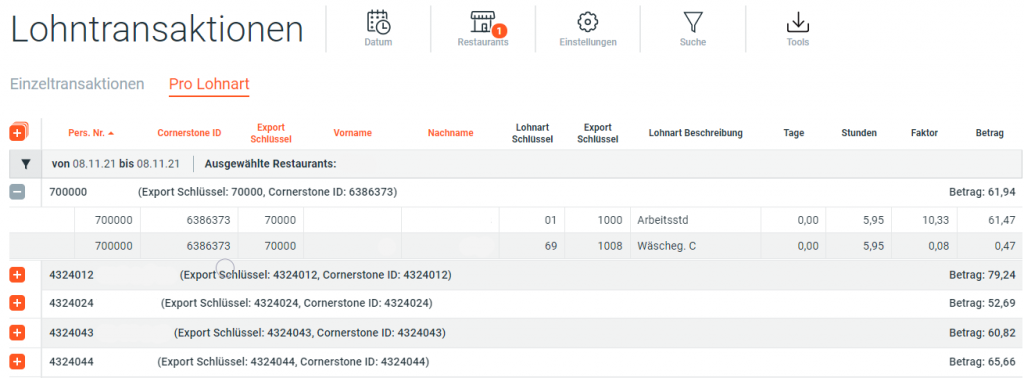
Column Details
| Name | Unit | Description |
|---|---|---|
| Badge No. | Integer | Employee number according to Reflexis |
| Cornerstone ID | Integer | Emplyee's Cornerstone ID |
| Export ID | Integer | ID assigned to the employee in DATEV Export |
| First Name | String | First name of employee |
| Last Name | String | Last name of employee |
| Transaction Date | Date | Transaction date |
| Transfer Date | Date | Date on which the transaction was transferred from Reflexis to Webcockpit. The transfer date is decisive for the DATEV export. |
| Restaurant Number | Integer | If an employee works in more than one restaurant, the respective restaurant numbers are shown here. |
| Earning Code | Integer | Earning Code according to Reflexis |
| Earning Description | String | Earning Description according to Reflexis (e.g. CPP, Holiday, Overtime) |
| Days | Decimal | Days |
| Hours | Decimal | Hours |
| Factor | Decimal | Factor |
| Amount | Decimal | Amount |
| Source System | String | Reflexis or RDS (For RDS data is always visible after monthly close) |
| Export Date | Date | Date of the DATEV export. If export has not yet taken place: blank |