Description
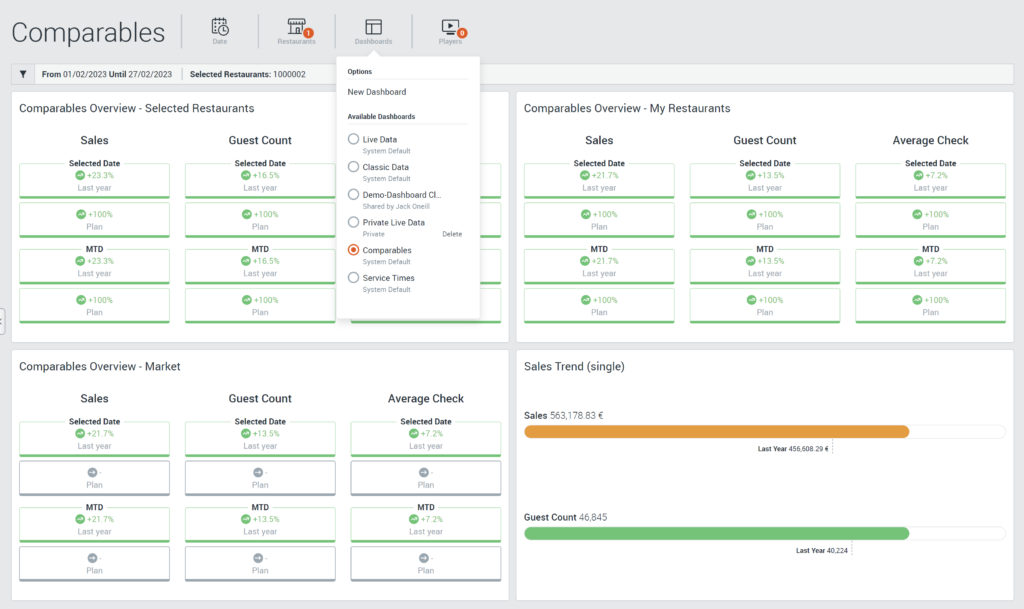
The Comparables Dashboard is a system layout that allows a comparison between the selected restaurants, all restaurants in the organisation and the market. The KPIs graphically displayed are Gross Sales (Product and Non-Product), Number of Guests and Average Check.
Within a widget, data for the time period defined via the filter and MTD (the 1st of the current month to the previous day) can be seen for the above KPIs. The sales development is shown in comparison to the previous year and to the planned sales.
It is intended that planned sales are missing for the market.
Column Details
| Name | Unit | Description |
|---|---|---|
| Selected date | - | Period selected via the 'Date' filter |
| MTD | - | Data from the first of the current month until yesterday |
| Sales Gross Total | % | Gross Product and Non Product sales are shown on the one hand in comparison to the previous year and on the other hand in comparison to the planned sales. When comparing a week, the same weekday from last year is the basis for the start of the week. If the period to be compared is one day, the same weekday of the previous year is taken. Otherwise, the same date is used for the calculation. |
| Guest Count | % | The number of guests is shown on the one hand in comparison to the previous year and on the other hand in comparison to the planned number of guests. When comparing a week, the same weekday from last year is the basis for the start of the week. If the period to be compared is one day, the same weekday of the previous year is taken. Otherwise, the same date is used for the calculation. |
| Average Check | % | Average Check is calculated as Gross Product Sales / Guest Count. Average Check is shown on the one hand in comparison to the previous year and on the other hand in comparison to the planned Average Check (Sales Planned / Guests Planned). When comparing a week, the same weekday from last year is the basis for the start of the week. If the period to be compared is one day, the same weekday of the previous year is taken. Otherwise, the same date is used for the calculation. |