Description
The report shows the eCash payments of the last 4 months. The Target Gross Sales column shows the amounts sent by the POS system, the Actual Gross Sales column shows the amounts sent by SIX. If several restaurants are selected, the upper view is cumulative and the lower view is per restaurant.
Default accounting and payment periods are set by McDonald’s but can be adjusted per store under eCash Settings module.
Filter
- Flexible restaurant selection
- Date: from day – until day
- Filter: Consider Payment Period (All, Yes, No)
- Search: Transaction ID
- Tools: Print page, Export to Excel
Filter: Consider Payment Period
All
An overview of all payments is displayed.
Yes
Consideration of payments that have not yet been received despite expired payment terms (error of a technical nature due to faulty transmission). Payments that still have an open payment term are hidden here. Payments that have not been received after 30 days are displayed in the column “days late” with a red background to draw the operator’s attention to this.
No
All open payments are considered, both those open longer than the payment term (deviation of a technical nature) and those with an open payment term that will most likely be received in the next few days (deviation of a temporal nature). Payments that have not been received after 30 days are displayed in the “days late” column with a red background to draw the operator’s attention to them. However, payments can have a negative “days late” because the payment term has not yet expired and they are still displayed.
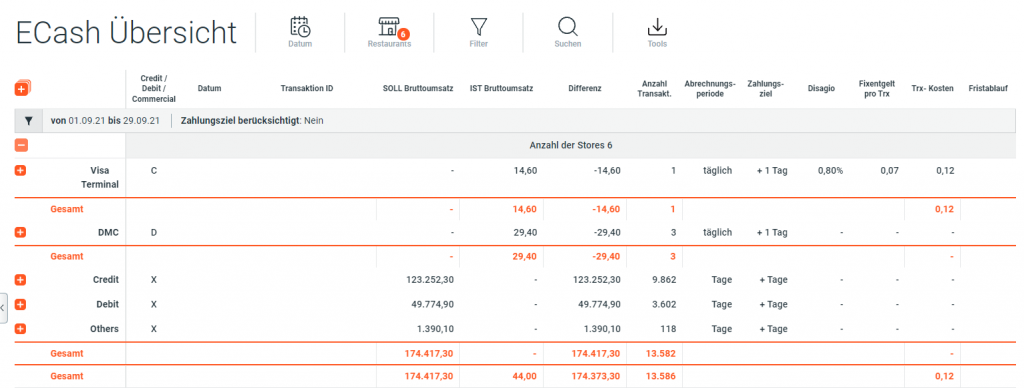
Column Details
| Name | Unit | Description |
|---|---|---|
| Date | - | Date |
| Unique ID | ID | Unique Transaction ID |
| Target Gross Sales | Decimal, Currency | Target Gross Sales |
| Actual Gross Sales | Decimal, Currency | Actual Gross Sales |
| Difference | Decimal, Currency | [Target Gross Sales - Actual Gross Sales] |
| Number of Transactions | # | Number of Transactions |
| Accounting Period | Period | Accounting Period for eCash transactions |
| Payment Period | # of days | Payment Period |
| Trx cost | Decimal, Currency | Transaction cost |
| Days Late | # | Days Late |