Tutorial
Description
Restaurant Groups, a powerful new feature designed to drastically simplify management and reporting for administrators overseeing large numbers of restaurants. This is an exclusive Pro Feature.
What are Restaurant Groups?
Restaurant Groups allow administrators to define and save custom collections of restaurants based on criteria that are relevant to your organization (e.g., geographical regions, store performance, specific brands, or operational types).
Instead of repeatedly selecting the same individual stores for reports or dashboard views, you can now select a pre-defined group with a single click.
Availability
| Subscription | Pro |
| Scope | All markets |
| Limitation | – |
Where to Find and Manage Groups
This feature is available to users with the Administrator role.
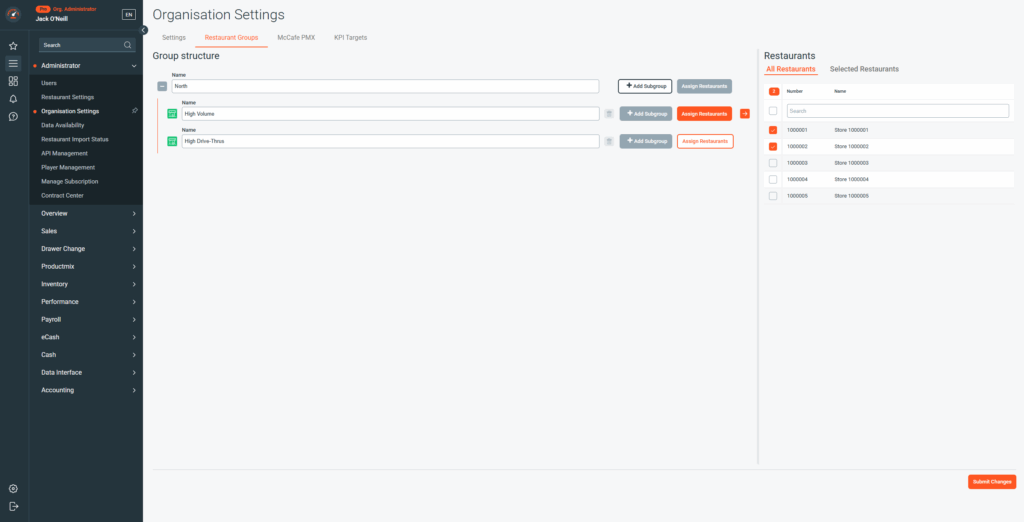
- Location: Groups are managed within Organisation Settings.
- Availability: Group creation and management is only possible on the Web App but Groups can be selected on both the Web App and the Mobile App.
How to Use Restaurant Groups
1. Group Creation
- Navigate to Organisation Settings.
- Select the Restaurant Groups tab.
- Define a Name (e.g. North Region Stores, High-Volume Drive-Thrus).
- Assign Restaurants or add Subgroups
- Select the restaurants you wish to include in this group.
- Click Submit Changes.
2. Filtering with Groups
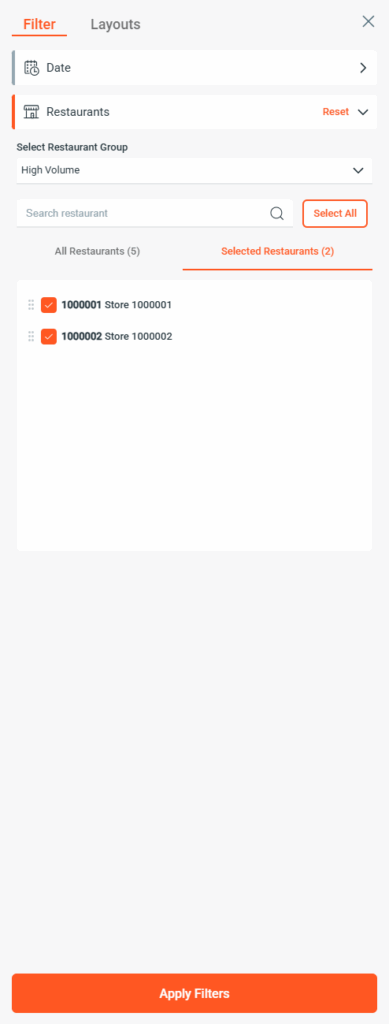
Once groups are established, you can utilize them within the standard Restaurant Selection Filter across all relevant reports and dashboards.
- When you open the filter, you will now have the option Select Restaurant Group and you can continue selecting All Restaurants as before.
- Selecting a Restaurant Group (e.g. North Region) automatically applies the filter to all restaurants within that group.
Key Benefits
| Benefit | Description |
| Massive Time-Saver | Eliminate the tedious, repetitive process of manually selecting the same large sets of stores. |
| Reduced Administrative Burden | Simplify daily, weekly, or monthly reporting tasks. |
| Consistency and Accuracy | Ensure that the exact same set of restaurants is used for comparisons across various dashboards and reports, minimizing filtering errors. |
| Focused Analysis | Quickly switch views to analyze performance by region, volume, or any custom operational segment you define. |