Description
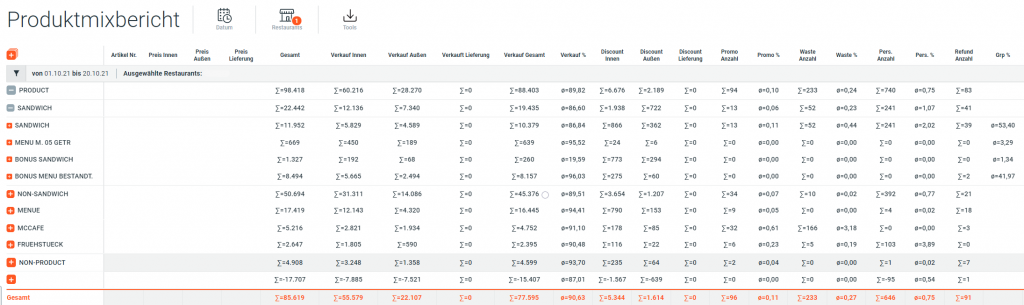
The Product Mix report shows the daily product mix for a configurable business day and restaurant.
The Product Mix is hierarchically grouped into:
- Product / Non Product
- PMX main groups (Sandwich / Non Sandwich / Breakfast)
- PMX groups
Subtotals and averages are calculated for each grouping. Groups can be collapsed and expanded interactively.
Explanation of some columns:
- Grp-%: Share of units sold of this product in relation to all sold units of the same product group.
- Tot-%: Share of units sold of this product in relation to all sold units of the same product main group.
- EUR Grp-%: Sales share of this product in relation to all sold units of the same product group.
- EUR Tot-%: Sales share of this product in relation to all sold units of the same product main group.
Row Details
| Name | Unit | Description |
|---|---|---|
| Code | Integer | Menu item product code |
| Price In | Decimal, Currency | Price In is the average of Gross Price In |
| Price Out | Decimal, Currency | Price Out is the average of Gross Price Out |
| Price Delivery | Decimal, Currency | Price Delivery is the average of Gross Price Other |
| Total | # | Total is computed as sum of UnitsSoldIn + UnitsSoldOut + UnitsSoldOther + UnitsRegularCustomerDiscountIn + UnitsRegularCustomerDiscountOut + UnitsRegularCustomerDiscountOther + UnitsRegularPromoIn + UnitsRegularPromoOut + UnitsRegularPromoOther + UnitsGMALPromoIn + UnitsGMALPromoOut + UnitsGMALPromoOther + UnitsWaste + UnitsEmployee + UnitsGMALCustomerDiscountIn + UnitsGMALCustomerDiscountOut + UnitsGMALCustomerDiscountOther + UnitsManager |
| Sold In | # | Sold In is the number of units sold in |
| Sold Out | # | Sold Out is the number of units sold out |
| Sold Delivery | # | Sold Delivery is the number of units sold other |
| Total Units Sold | # | Total Units Sold is computed as UnitsSoldIn + UnitsSoldOut + UnitsSoldOther - UnitsRefund |
| Total Units Sold w. Discounts | # | Total Units Sold is computed as UnitsSoldIn + UnitsSoldOut + UnitsSoldOther + DiscountIn + DiscountOut + DiscountOther - UnitsRefund |
| Sales % | % | Sales % is computed as a percentage of Total Units Sold from UnitsTotal |
| Discount In | # | Discount In is UnitsRegularCustomerDiscountIn + UnitsGMALCustomerDiscountIn |
| Discount Out | # | Discount Out is UnitsRegularCustomerDiscountOut + UnitsGMALCustomerDiscountOut |
| Discount Other | # | Discount Other is UnitsRegularCustomerDiscountOther + UnitsGMALCustomerDiscountOther |
| Promo Units | # | Promo Units is computed as UnitsRegularPromoIn + UnitsRegularPromoOut + UnitsRegularPromoOther + UnitsGMALPromoIn + UnitsGMALPromoOut + UnitsGMALPromoOther |
| Promo % | % | Promo % is computed as a percentage of Promo Units from UnitsTotal |
| Waste Units | # | Waste Units |
| Waste % | % | Waste % is computed as a percentage of Waste Units from UnitsTotal |
| Employee Units | # | Employee Units is UnitsEmployee + UnitsManager |
| Employee % | % | Employee % is computed as a percentage of Employee Units from UnitsTotal |
| Refund Units | # | Refund Units |
| Grp % | % | Share of current item Gross Sales from the Gross Sales of entire group |
| Tot % | % | Share of current item Gross Sales from the Gross Sales of entire report |
| Gross Sales | Decimal | Gross Sales |
| LC Grp % | % | Share of current item TotalUnitsSold from the TotalUnitsSold of entire group |
| LC Tot % | % | Share of current item TotalUnitsSold from the TotalUnitsSold of entire report |
| Sales Units Per 1000 Guests | Decimal, Currency | Sales Units Per 1000 Guests is computed as Total Units Sold divided by the total number of guests, multiplied by 1000 |
| Total Units Per 1000 Guests | Decimal, Currency | Total Units Per 1000 Guests is computed as Total divided by the total number of guests, multiplied by 1000 |
| Net Sales | Decimal, Currency | Net Sales if available in the Pmx table otherwise is computed from the PmxCosts NetSalesIn + NetSalesOut + NetSalesOther |
| Food Cost Sold | Decimal, Currency | Food Cost Sold is computed with the costs from PmxCosts table and the sold units from the Pmx table FoodCostIn * UnitsSoldIn + FoodCostOther * UnitsSoldOut + FoodCostOut * UnitsSoldOther |
| Food Cost % | % | Food Cost % is computed as the percentage of the Food Cost from the Net Sales |
| GMAL Customer Discount In | # | GMAL Customer Discount In units |
| GMAL Customer Discount Out | # | GMAL Customer Discount Out units |
| GMAL Customer Discount Other | # | GMAL Customer Discount Other units |
| Regular Promo In | # | Regular Promo In units |
| Regular Promo Out | # | Regular Promo Out units |
| Regular Promo Other | # | Regular Promo Other units |
| Total Regular Promo | # | Sum of Regular Promo In, Out and Other units |
| GMAL Promo In | # | GMAL Promo In units |
| GMAL Promo Out | # | GMAL Promo Out units |
| GMAL Promo Other | # | GMAL Promo Other units |
| Total GMAL Promo | # | Sum of GMAL Promo In, Out and Other units |
| Manager Units | # | Manager Units |