Description
The Receipts report provides a comprehensive, detailed list of all transactions recorded in your stores. This report is essential for deep operational analysis, auditing, and reconciliation. As this is a Pro feature, it offers advanced filtering capabilities to help you quickly locate the exact receipts you need.
Availability
| Subscription | Pro |
| Scope | All markets |
| Limitation | – |

How to Access the Receipts Report
- Log in to your Webcockpit.
- Navigate to the Sales section in the main menu.
- Select the Receipts report.
Key Filtering Options
The Receipts Report allows you to drill down into your data using several powerful filters. Use these options to narrow down the list to specific transactions:
| Filter Name | Description | Example Use Case |
| Time | Filter receipts based on the exact time they were processed. | Find all transactions completed during the lunch rush (e.g. 12:00 PM to 2:00 PM). |
| Registers | Filter receipts by the specific register(s) used for the transaction. | View all sales processed only on Register 3 to audit that device. |
| Amount | Filter receipts based on the total transaction amount. | Identify all high-value transactions (e.g. amounts greater than €100). |
| Filter by Type | Filter by the type of receipt (e.g. Sale, Refund, Void, Discount). | Separate all Refund transactions to track returned receipts. |
| Receipt contains | Search for receipts that contain specific types of sales within the receipt details (e.g. Promo, RAT, RBT). | Locate all receipts that included “Promo”. |
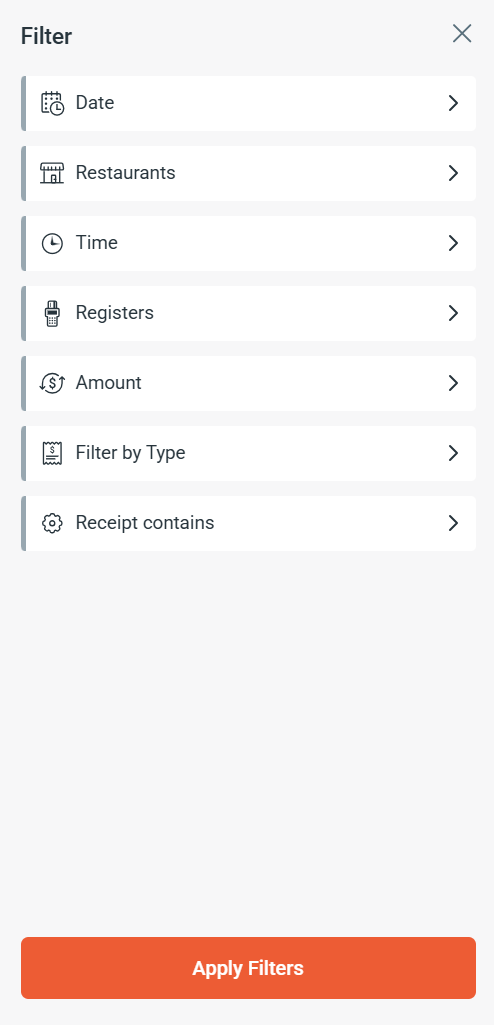
Pro Tip: You can combine multiple filters (e.g. by Time and Registers) to create highly specific reports.
Important Note: Pro Feature
Please remember that the Receipts report and its advanced filtering options are available exclusively as part of your Pro subscription package.
Column Details
| Name | Unit | Description |
|---|---|---|
| Receipt Number | Integer | Receipt Number |
| Receipt Type | String | Receipt Type |
| Sale Time | Date, Time | Sale Time |
| Amount | Decimal, Curreny | Amount |
| Sale Type | String | Sale Type |