Webcockpit Knowledge Base

Find answers to frequently asked questions about Webcockpit and the right solution.

Feature Update for Webcockpit Pro

We are pleased to announce that we have supercharged your Pro Subscription with a suite of powerful new features. These upgrades are designed to streamline your daily management processes, giving you deeper insights and more control than ever before.

Here are the key new Pro features now available to you:

1. The Ultimate Daily KPI Overview

Get a comprehensive look at your performance with a report that goes far beyond the basics.

  • Over 450 Available KPIs: Dive into a vast library of metrics from all your integrated systems.
  • Multi-Restaurant Comparison: Compare the performance of multiple restaurants side-by-side in a single report to instantly spot anomalies and identify best practices.
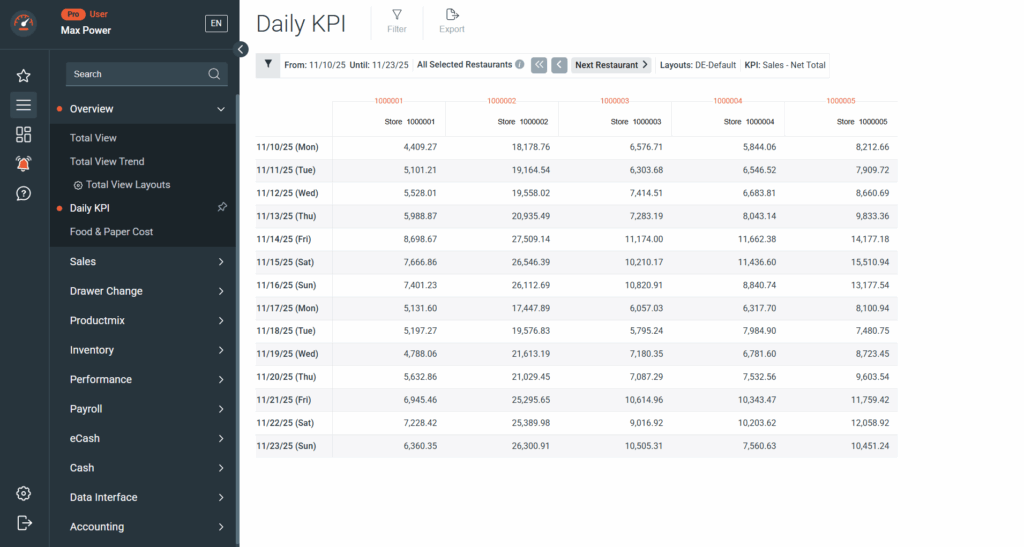
➡️ Learn More: Overview – Daily KPI

2. Full Transparency with the Receipt Report

The end-to-end transparency you need for audits and operational analysis.

  • Detailed Transaction Lists: See every single cash register receipt across all your locations.
  • Advanced Filter Options: Powerfully filter transactions by Time, Registers, Amount or Receipt Type (e.g. Sale, Refund, Void, Discount) to instantly drill down on any data point.
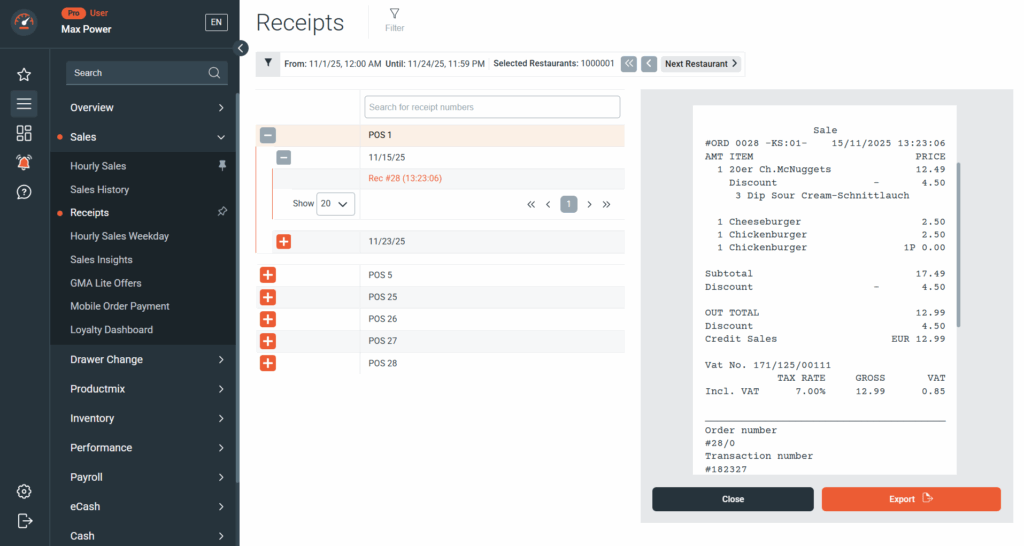
➡️ Learn More: Sales – Receipts

3. Increased Accountability through the Deposit Report (DE)

Track and manage deposit returns with enhanced accuracy.

  • Detailed Deposit Return Insights: The new report clearly shows you the total deposit return amounts.
  • Employee-Level Accountability: See exactly which employee handled how many deposit returns. This simplifies till reconciliation and reduces inaccuracies.

➡️ Learn More: Drawer Change – Deposit

4. Efficiency Boost with Restaurant Groups

For administrators managing a large number of restaurants, these groups are a massive time-saver.

  • Custom Group Definition: Define and save individual collections of restaurants (e.g., by region, company, or performance tier).
  • One-Click Filtering: Filter all relevant reports and dashboards for an entire group of restaurants with a single click – no more tedious manual selection.
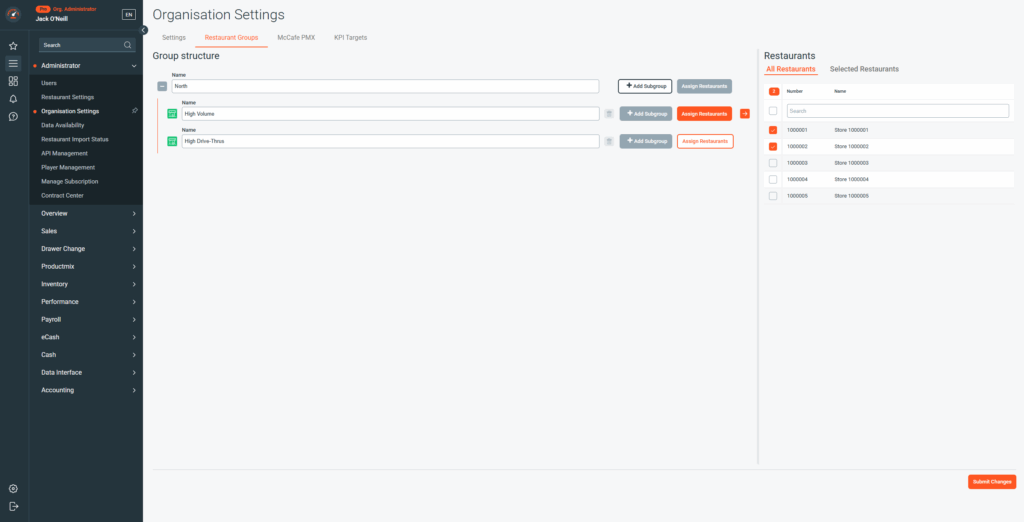
➡️ Learn More: How To – Restaurant Groups

5. Your Data, Always On: The Webcockpit Dashboards Tablet App

Bring the power of your Webcockpit Dashboards directly to your tablet.

  • Data on the Go: Access all dashboards configured in the Web App via the dedicated Pro App – optimized for mobile viewing.
  • Uninterrupted Display: Activate the Keep display on feature to show your most important metrics continuously on the screen – perfect for in-store monitor and management applications.
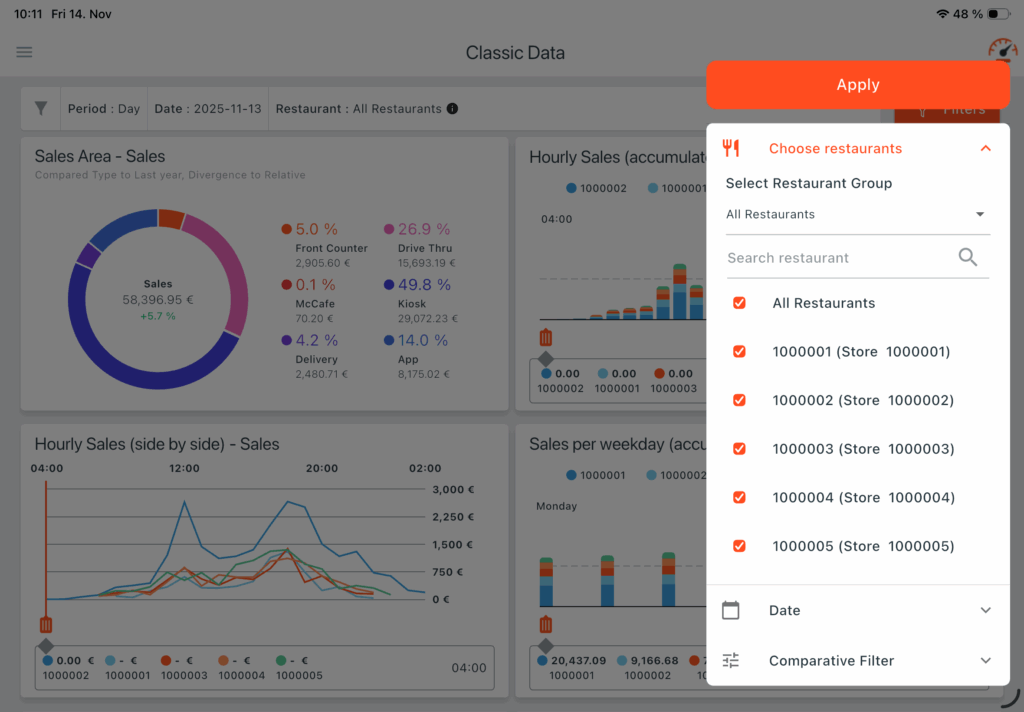
➡️ Learn More: Tablet App – Webcockpit Dashboards

Ready for Maximum Performance?

These features are available exclusively to our Pro Subscription members. If you are already a Pro subscriber, these tools are available to you immediately.

Is your subscription not Pro yet? Now is the perfect time to upgrade and take your management to the next level.
Upgrade now and start leveraging all the benefits!

Power-Up for Data & Efficiency

We’ve rolled out a series of powerful updates to both the Webcockpit Web App and the Mobile App over the past few weeks, focusing on improved data visibility, reporting flexibility, and efficiency for our users.

Dashboard & Data Visibility Upgrades

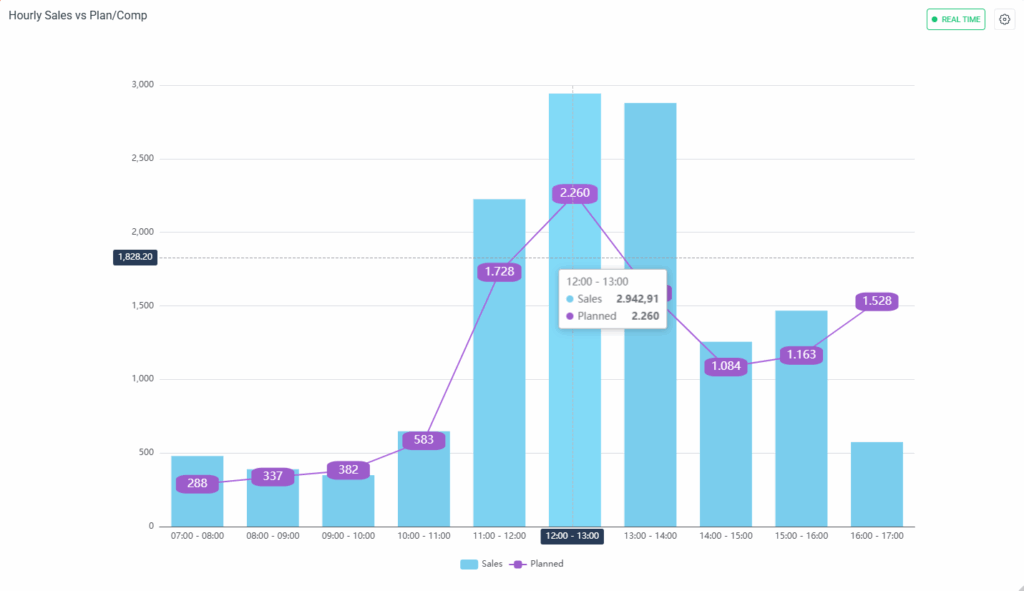
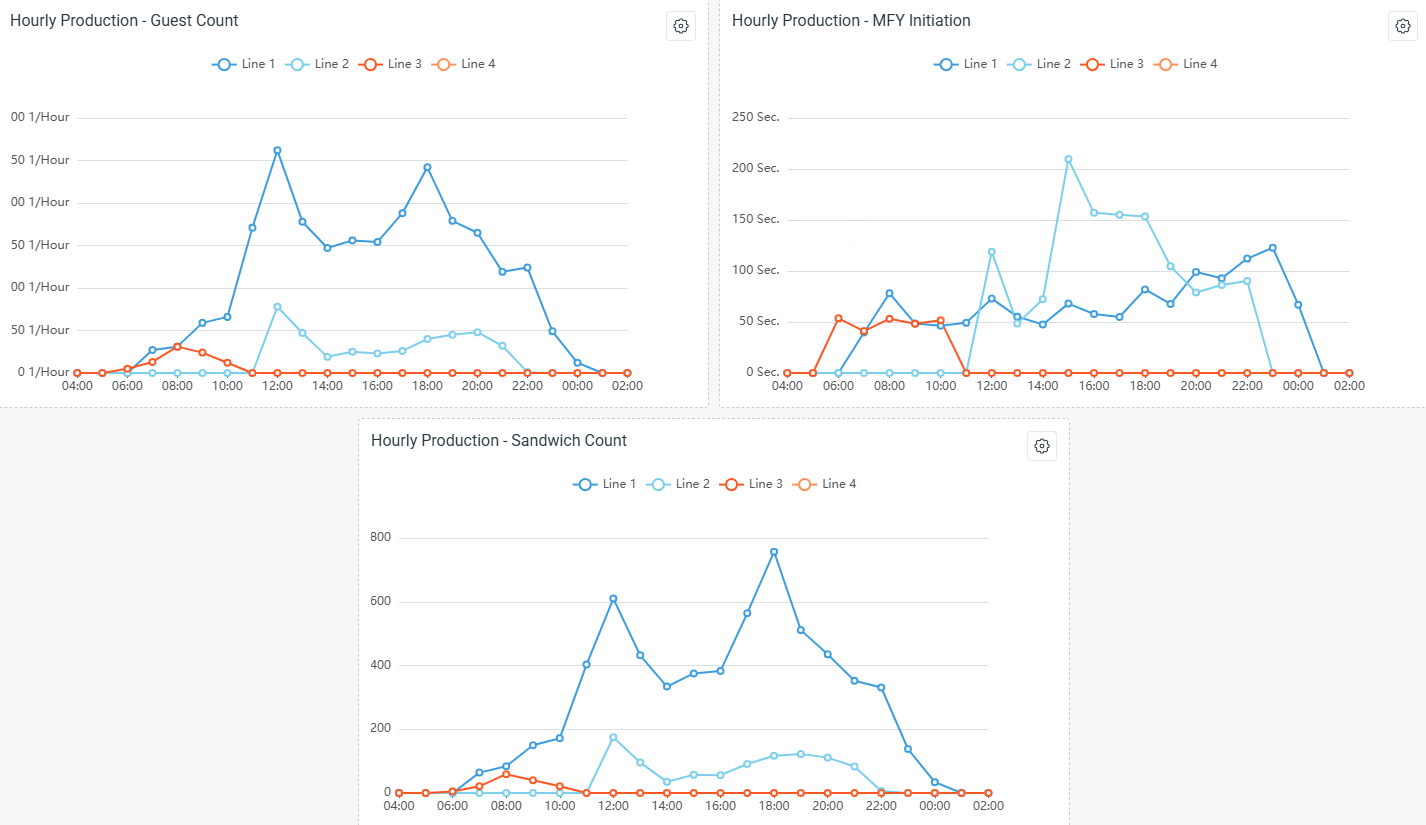
We’ve added two new widgets to your Dashboards (Pro Feature) on both the Web App and Mobile App, giving you instant access to critical operational data:

Hourly Sales vs. Planned/Last Year Live Data Widget: Monitor sales performance against your targets or last year in real-time. This widget helps managers make timely, data-driven decisions to hit their goals.


Hourly Production Line Historic Data Widget: Get a clearer view of your production performance trends by viewing historical data hour-by-hour. This is essential for identifying bottlenecks and optimizing processes.

Restaurant Groups for Streamlined Multi-Store Management

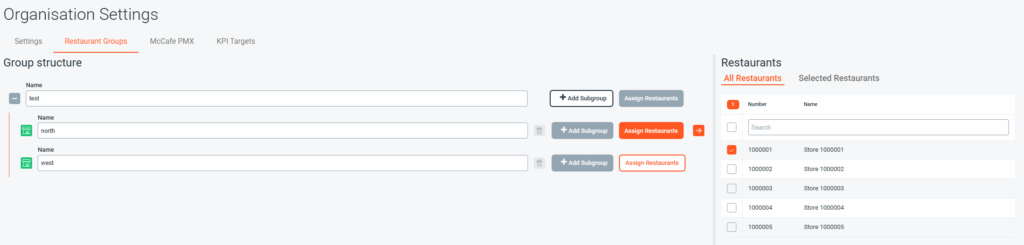
We’ve introduced a major efficiency feature for administrators managing large numbers of restaurants: Restaurant Groups (Pro Feature).

  • This feature is available in Organisation Settings (accessible by the Administrator role) on both the Web App and Mobile App.
  • How it works: Administrators can now define custom groups of restaurants (e.g., “North Region”, “High-Volume Stores”).
  • In the Restaurant Selection Filter, you can choose one group instead of manually selecting the same 5, 10, or 20 individual locations repeatedly. The filter offers the option to select from groups first, or all individual restaurants.
  • Benefit: This is a massive time-saver, reducing administrative burden and ensuring consistent filtering across various reports and dashboards.

Reports & API Flexibility

Customizable Reports with Column Selector

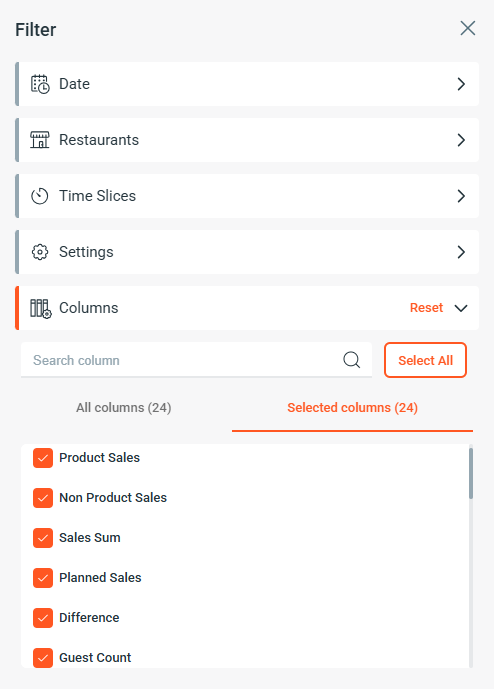
  • We’ve significantly enhanced reporting by implementing the Column Selector feature across all reports on both the Web App and Mobile App.
  • What this means for you: You no longer have to view every data point! Easily select and deselect which columns appear in your reports. This simplifies report viewing, allows you to create highly focused views, and makes reports much faster to analyze.

API Update: Stable Identifiers for Daily KPIs (Pro Feature)

  • For users leveraging our data integration tools, the Customer API GetDailyKPI has been improved.
  • The Total View labels now include a unique and static identifier per row.
  • Benefit: This ensures greater stability and reliability for systems consuming and processing daily KPI data, simplifying your integration logic

Contract Management Center

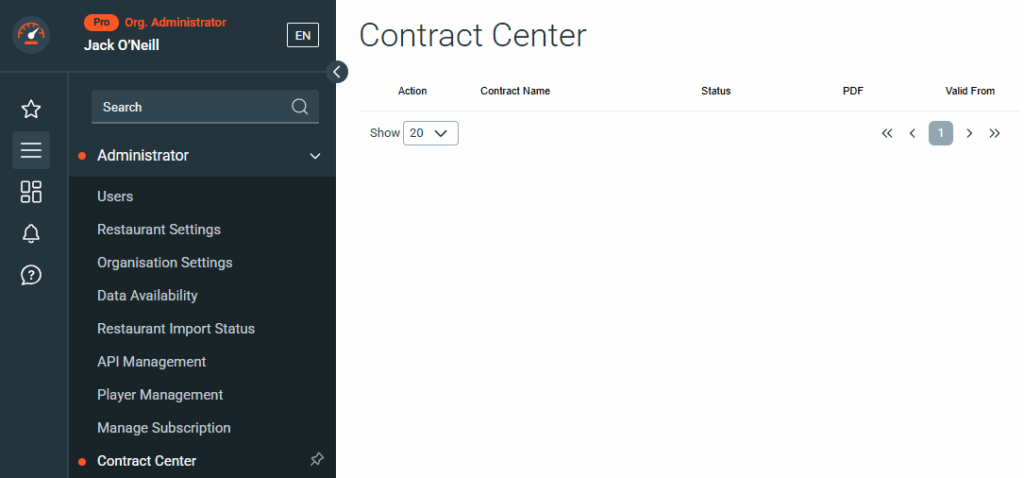
A new dedicated module, the Contract Center, has been added to the Web App.

  • This new module provides a centralized place for administrators to view and manage all their Webcockpit service agreements and contracts.
  • Benefit: Keep your contract information organized, accessible, and up-to-date in one easy-to-find location within the platform.

We are committed to continuously improving Webcockpit to make your operations smarter and simpler. As always, please reach out to our support team if you have any questions about these new features!

New Features and Improvements (2025.07)

We’re excited to announce several new updates and features, designed to improve your user experience and streamline your workflow. Here’s a quick rundown of what’s new:

Edit Dashboards & Layout Management

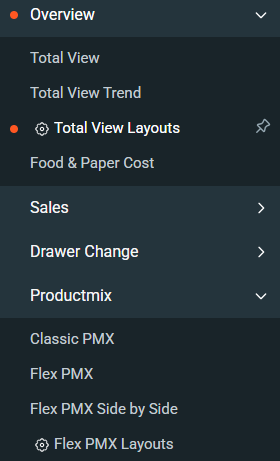
We’ve made it easier than ever to manage your dashboards. New navigation items have been added to the main menu, giving you direct access to the Total View Layouts and Flex PMX Layouts pages. This change simplifies navigation and puts the power of dashboard customization right at your fingertips.

Date Picker Redesign

Based on your feedback, we’ve enhanced the date picker filter for better clarity. After selecting an start date for a custom period, you will now see a new label, choose end date. This subtle but important change ensures a more intuitive and user-friendly experience when filtering data by date range.

Last Selected Restaurants Now Saved

Tired of having to re-select your preferred restaurants every time you log in? We heard you! Your last selected restaurants are now persisted across login sessions. This means you can pick up right where you left off, saving you time and effort.

Restaurant Search Improvements

Finding the right restaurant is now faster and more efficient. We’ve updated the restaurant filter search to allow you to search not only by display number but also by the restaurant’s number and name. This gives you more flexibility and precision when looking for specific locations.

We’re committed to continuously improving our platform to meet your needs.
We hope these new features make your work easier and more productive.
Stay tuned for more updates!

Webcockpit Just Launched Live Productivity

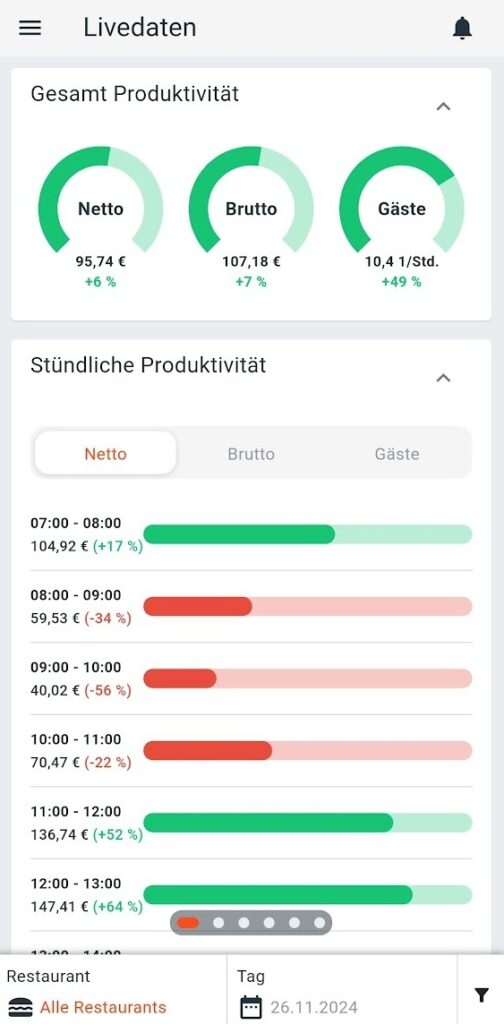
We’re thrilled to announce the launch of our newest feature, Live Productivity designed to help you manage your restaurants.

At Webcockpit we’re committed to constantly improving your experience and providing you with the tools you need to succeed. That’s why we’ve been hard at work developing the live productivity, which will allow you to:

  • Display net, gross and guest productivity in real time
  • On an hourly basis and in the daily view
  • From various time recording systems

Supported systems:

  • MyStore with SOTEC TD time recorders
  • Crew hours from any system that synchronizes with MyStore (e.g., Reflexis, Easy@Work) can be displayed in Webcockpit. This generally includes any system whose crew hours are visible in the MyStore hourly sales report.
  • MeinDienstplan
  • Nesto

Live Productivity is available now for all Webcockpit PRO subscriptions with enabled Live Addon. Currently, the display is only possible in the Webcockpit smartphone app. We are working on integrating live productivity into our desktop dashboards and our in-store dashboard.

Here’s how to start using it:

  • For most markets and stores no additional setup is required
  • If the productivity is not displayed, check the MyStore hourly sales report to see if crew hours are displayed there for the current business day
  • Contact our support team for further assistance

We believe the live productivity will be a game-changer for your restaurants. We can’t wait to hear what you think! Further information on calculating productivity can be found here.

A great day for Webcockpit!

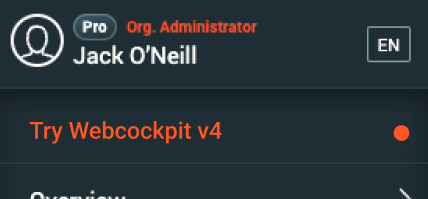
Starting today, you have the opportunity to try out the next version of Webcockpit and familiarize yourself with the new features. The most used reports are already available, everything else will be added in the coming weeks and months. Open the new version either via the navigation menu or directly with next.webcockpit.app.

This new version will become the standard from November 2024 and will replace the current version of Webcockpit. Therefore, take the opportunity and give us feedback on the new features: Questionnaire

Further information (including timeline) can be found in our knowledge base: Further Information

If you have any questions, we are available to you through the usual channels.

Meet SOTEC @ WWC24

From 08.04 to 11.04 SOTEC will be represented at the McDonald’s World Wide Convention in Barcelona. Meet Ralf Klein and Simon Leichtle on site with or without an appointment. Take the opportunity for a personal exchange. SOTEC does not have its own stand, but we will be in the Digital Experience area at least from 10:00 – 12:00 daily, primarily at the Google stand or the Global Technology stand.

Book Meeting here

Questions? >>> webcockpit@sotec.eu <<<

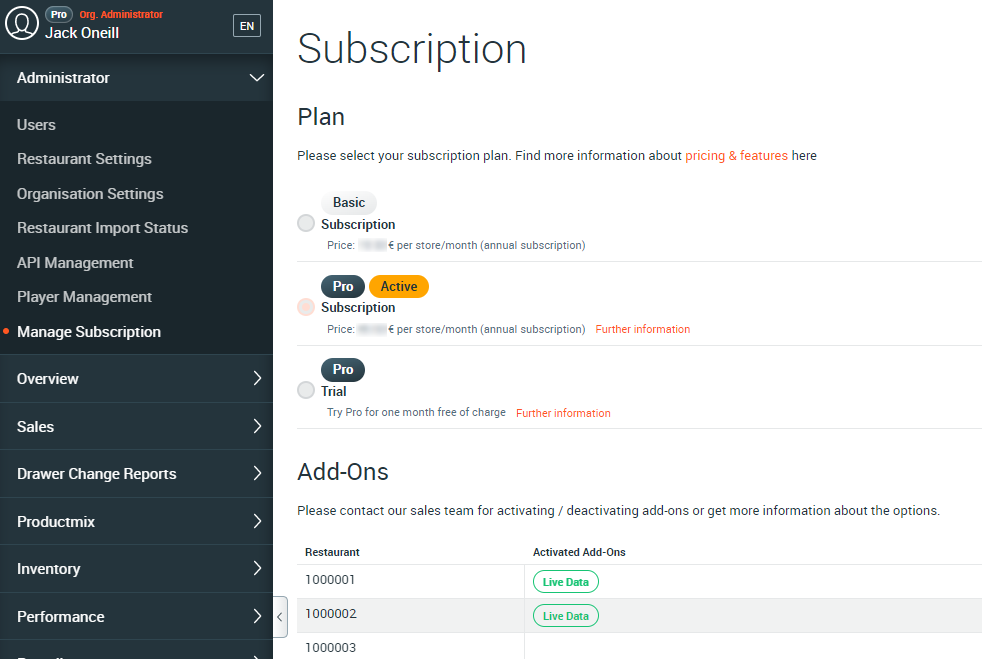
Manage subscription

For easy viewing and administration of your Webcockpit subscription, we have created a new overview page. This can be accessed by users with the Administrator role.

The 6-month trial period for Webcockpit PRO ends on 01.01.2023. All users who have not already pre-registered for Webcockpit PRO will automatically be switched to Webcockpit BASIC after the end of the trial period. However, Webcockpit PRO can be selected again at any time via the new overview page.

>>> Webcockpit PRO <<<

More Information: Documentation

Webcockpit Live

Webcockpit goes live! From now on we provide the possibility to update selected key figures in 15 minute intervals live from the restaurant. The following key figures are included:

  • Total sales per sales area
  • Total guests per sales area
  • Average per sales area
  • R2P total
  • OEPE total
  • R2P hourly
  • OEPE hourly
  • Sales total Comparable
  • Guests total Comparable
  • Hourly sales per sales area
  • Plan: Productivity

Webcockpit Live data is displayed in the following reports:

Mobile App (iOS, Android)

As soon as the live data for a restaurant is activated, a new item “Live data” appears in the menu of the Webcockpit smartphone app. 

Mobile App Live Module

Dashboard / Player

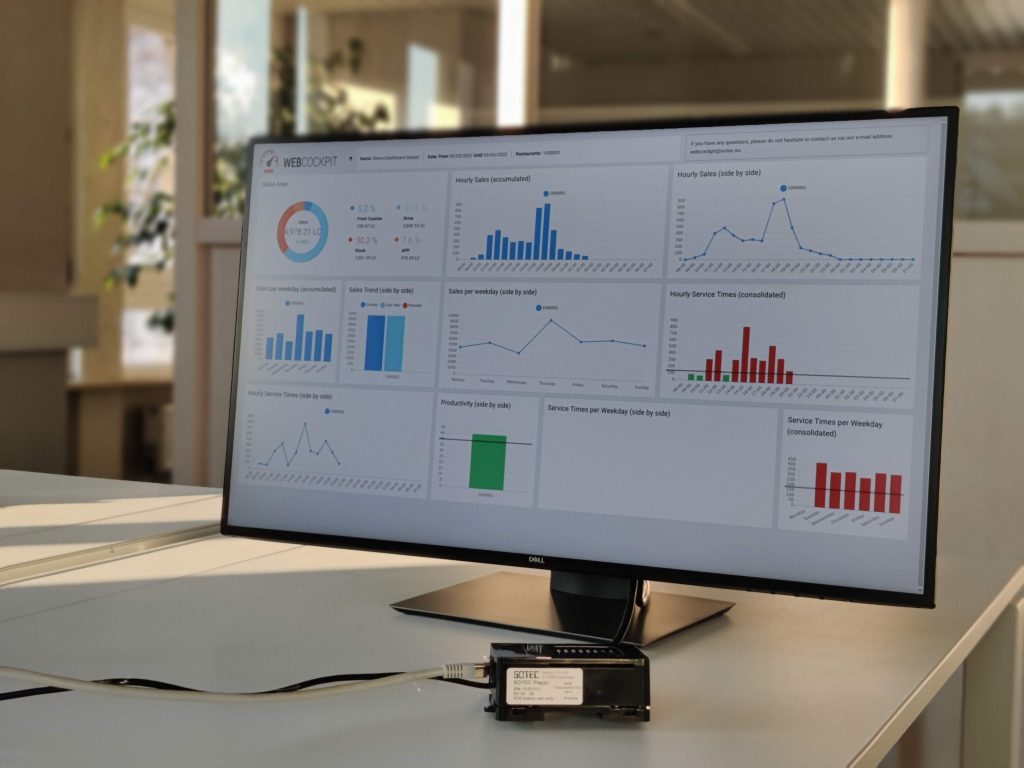
A variety of widgets are available for the Webcockpit dashboard that graphically visualize the live data in the web application. In addition, we will soon create an option to display the web cockpit dashboards via new hardware on screens in the crew area or in the office.

External dashboard with player

Apple Watch

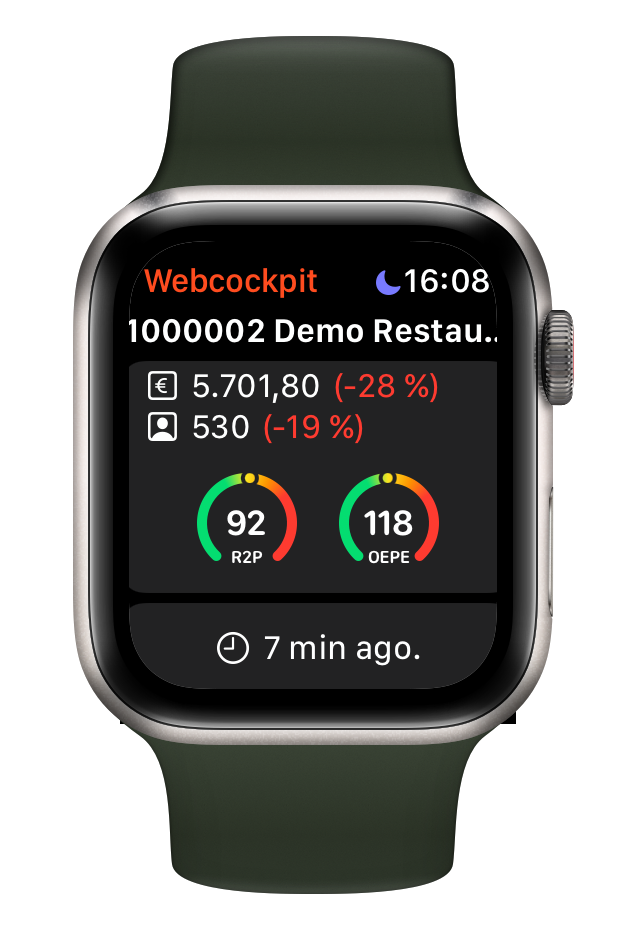
In our new Apple Watch app, sales, guests and service times are conveniently delivered to your wrist.

Webcockpit Live Data can be booked and activated as an addon by all users of Webcockpit Pro.

However, the live addon requires an individual release of the market, which is not yet given everywhere. If you are interested, use the following form to register. We will inform you as soon as the feature is available for you.

Webcockpit PRO

Availability and trial

Webcockpit PRO is a new version of Webcockpit that will be available from 01.01.2023. Starting July 2022, all Webcockpit users will be unlocked to Webcockpit PRO free of charge for 6 months. The free trial will run until 31.12.2022. If you do not actively decide to take out a PRO subscription, you will automatically receive Webcockpit Basic again at the end of the year.

Features

There are already some features that are exclusive to Webcockpit PRO and more features will follow later this year.

Graphical dashboards

Our new dashboards enable the visualization of key figures, such as hourly sales or service times. Webcockpit users can define the appearance and structure of the dashboard themselves or use ready-made dashboard layouts. Depending on the chart type, there are additional settings, e.g. the definition of threshold values, the exceeding of which visually highlights the key figures.

Sample Dashboard

Customer satisfaction

The Customer Satisfaction module gives you an overview of the results of customer surveys. The module is available on the website and the mobile app. In addition, the module includes a ranking function, with which you can directly see in which segment your restaurant is located.

Customer Satisfaction Module (CSAT)

Comparable Dashboard

The Comparable dashboard gives you detailed information about the development of your sales, guests and average sales compared to last year. In doing so, you can look at how individual or all restaurants compare to your organization or the market. A ranking of restaurants allows you to rank your restaurants in the market.

Comparables in der App

Webcockpit Connect

Webcockpit Connect is a collection of software interfaces that you can access to consume and process restaurant data. The focus here is not on a graphical user interface, but on the possibility for third party applications to get data from Webcockpit. You have full control over this.

Webcockpit API Description

E-Cash Reconciliation (DE specific), Q3 2022

This new module allows reconciliation of card payments (daily cash report, per business day) with the individual transactions of the POS system and payment service providers (Gestalterbank, FirstData, Ayden). The goal is to create a report that allows users to see at a glance if all payments are balanced.

 BMD Export (Österreich), Q3 2022

BMD Export will allow bookings from the restaurant ERP (MyStore) to be transferred directly and electronically to the BMD accounting software.